 Toqet
Help › Chapter 2
Your first workout
From opening the app to logging your last set. On Apple Watch or just your iPhone, your call.
In this chapter
What's on today
Open Toqet and stay on Train. At the top you'll see how ready you are today. That's your readiness score, built from last night's sleep, resting heart rate and HRV. Below it, the Today card shows the routine that's up next.
Want a look before you warm up? Tap the card. Up top there's a recap of last time and what today calls for: more weight, or one more rep. Below that, every exercise lists its sets, rep range and weight. The Aim for line is the reps you're going for in each set today. Hit the top of the range on every set and it's time to add weight.


Once you're at the bench, tap Start. If you're wearing your Apple Watch, you choose whether the workout runs on the watch or just on your iPhone. Both log the same things and end up in the same history.
Scroll down to "Free Workout, No Routine" and add exercises as you go.
On Apple Watch
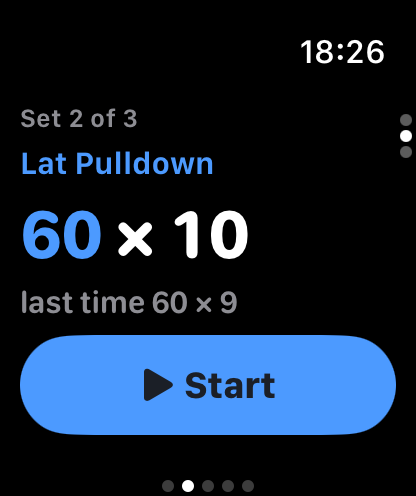
Your watch tells you what's next: exercise, set number, weight and reps. Underneath, what you did last time, so you know what you're up against.
- Get set and tap Start. From then on, the watch tracks every rep.
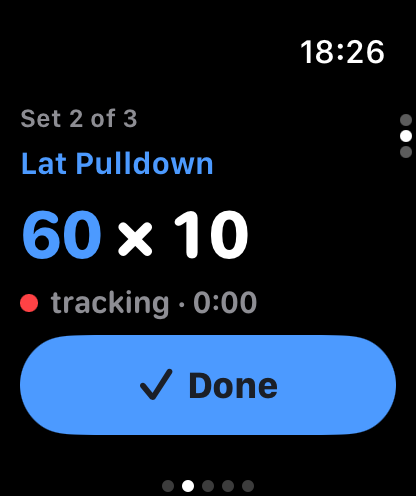
- Do your set. When you rack it, tap Done.
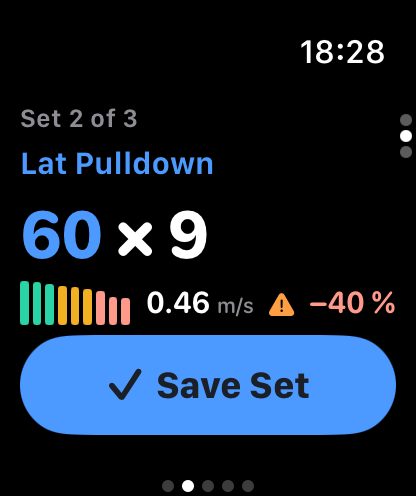
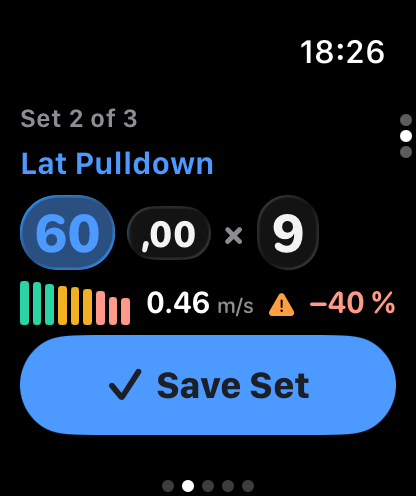
- Check what it counted and tap Save Set. Missed a rep, or the weight's off? Tap the number and fix it right there with the Digital Crown.
- Your rest starts. When it hits zero, the watch taps your wrist and moves straight to the next set.
The speed bars
Each bar is a rep, and its height is how fast you moved the weight. Early in the set they're quick; as you tire, they slow down. Toqet compares every rep with the fastest one in that same set. Once the drop goes past your limit (20% out of the box), it tells you. Past that point you're piling on fatigue more than you're building anything.
The colour tells you at a glance: fast, slowing down and past the limit. You can set the limit per exercise in your routine to 10, 20, 30 or 40%, depending on whether you're chasing strength or volume.
The watch sits on your wrist, not on the bar, so its m/s won't match a lab-grade encoder. That's why Toqet never compares you with anyone else. It compares your reps with your reps, and for that it's reliable.
Resting
The countdown fills the whole screen with colour. Up top you get the exercise and the time you'll finish your workout; at the bottom, your next set. Swipe right for the controls, including End, Discomfort (to log a niggle) and Machine Taken, which lets you jump to another exercise and come back to this one later.
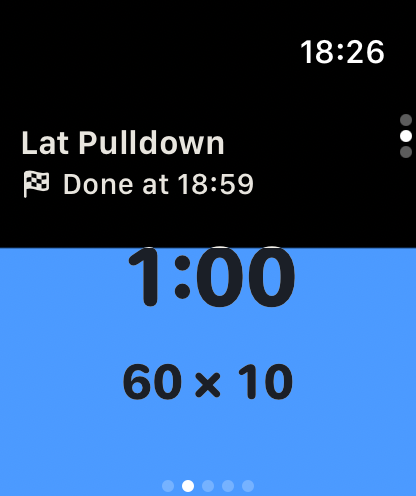
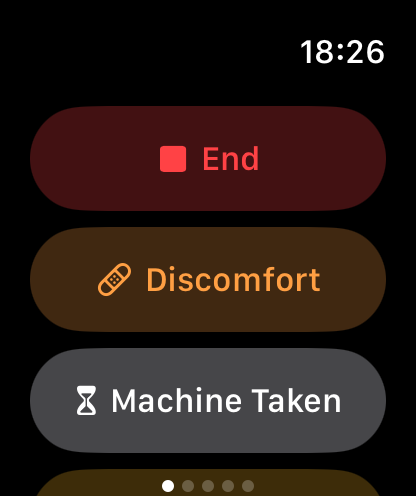
Meanwhile your iPhone follows along live, and your set and rest also show up on the Lock Screen and in the Dynamic Island. You don't need to touch it.
Settings › Watch has Automatic Set Detection (beta). The watch starts the set once it sees a few reps in a row. It's off by default because walking around or loading the bar can fool it.
On iPhone
Training with just your phone? Each exercise is a table: the set, what you did last time, the weight, the reps and RIR (reps in reserve). Change the numbers if you need to and tap the circle to log the set. It turns green and your rest timer kicks off.
Above the table you'll find that exercise's rest time, today's target and your notes. For barbell lifts, Toqet also tells you which plates go on each side. The countdown sits at the bottom: −15 and +15 to adjust it, and Skip to cut it short. The header shows when you'll be done.

Need to reply to a text? The arrow in the top left tucks the workout away. It keeps running, and you can jump back in whenever you like. To finish, tap End.
Full Screen
The arrows button at the top switches the workout to full screen with huge numbers. It's made for propping your iPhone on the bench or the floor and reading it from wherever you are.
During a set you see the exercise, weight and reps, with the speed bars appearing below as you go. They start out hollow: Toqet waits for three similar reps before it counts them, so getting into position or walking to the rack doesn't register as a set. During rest it's just the countdown, your finish time and what's next. Slide the button at the bottom to exit.


When you're done
When you finish, Toqet shows your summary: time, sets, total volume, the day's PRs, the lifts where you went up and the muscles you hit. If this session completes your week, you'll see that too, along with the Toqs you've earned. Tap Done and it's saved.
After that it lives in History. Open any workout to fix a set with "Edit" or change how hard it felt. The arrow marks where you improved; the crown marks a PR.


No maths needed. Toqet looks at today's session and sets up the next one: same weight and one more rep or, if you've hit the top of the range, more weight. The progression chapter explains how it decides.