 Toqet
Help › Chapter 4
Bar speed
Your watch measures how fast you move the weight on every rep. Here's what that means, what it's good for and what not to expect from it.
In this chapter
What the watch measures
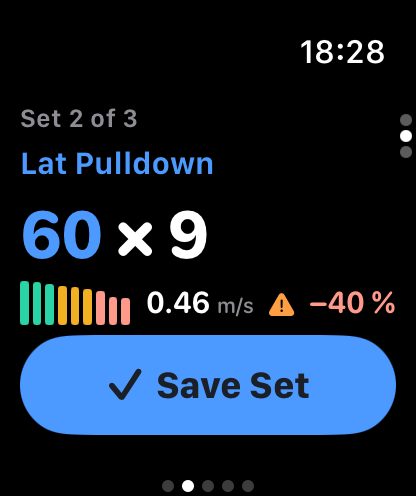
While you do your set, the watch tracks your wrist and works out the average speed of the effort part of every rep (the push on a bench press, the pull on a pulldown), in metres per second. Each bar you see is one rep; the taller it is, the faster you moved the weight.
With the same load, bar speed drops as you tire, and that drop tracks how much the set has taken out of you (Sánchez-Medina and González-Badillo, 2011). So you get a number for what's left in the tank, not just a feeling. It's the basis of velocity-based training: the same group had already shown that bar speed tells you how close a weight is to your max (González-Badillo and Sánchez-Medina, 2010).
Velocity loss
Toqet compares every rep with the fastest one in the same set. When the drop goes past that exercise's limit, the watch buzzes: time to rack it. The default limit is 20%, and you can set 10, 20, 30 or 40% on each exercise in a routine (or any value you like, in steps of 5).
Why not grind out every rep? In an 8-week squat study, stopping at a 20% loss gave similar strength gains to going to 40%, with far fewer reps and a bigger improvement in jump height. Going to 40% built a bit more muscle, at the cost of more fatigue (Pareja-Blanco et al., 2017). That's why there's one target for strength and others for hypertrophy.
It's a heads-up, nothing more: keep going and log the reps you do. And if you'd rather not have it at all, set Training Mode to By Reps, either in Settings › Training for every exercise or on an exercise's page for just that one. Velocity is still measured and shown, but it won't alert you or end the set, and progression decides the weight.
How it counts reps
So that getting into position or walking to the rack doesn't count as a set, Toqet waits until it sees a few similar reps in a row (three by default; you can change it in Settings) before it treats the set as started. Until then, the bars in Full Screen stay hollow.
If the watch misses a rep or adds one, fix it when you save the set by tapping the number. On exercises where your wrist doesn't move with the weight, the watch doesn't measure and the set saves with one tap. On single-arm work, Toqet tells you which arm to start with so it measures the one wearing the watch.

What not to expect
The watch sits on your wrist, not on the bar. Its m/s won't match a lab-grade encoder, and research has only validated wrist-based velocity for a handful of exercises. That's why Toqet never compares you with tables or with anyone else: it compares your reps with your reps, same weight, same watch. For that, it works.
If you also track bar speed with another app or device, the exercise page has Calibrate with Another App under Edit: Toqet compares both readings and corrects the difference.
The watch can also draw a line over the bars showing your best set at that weight from the last 8 weeks, as a reference. It shows up once you've trained with that weight at least twice, and you switch it on or off under Settings › Watch › Best-Set Line. The app won't say "faster" or "slower"; it just shows you the line.
Strength & Velocity
In Progress you'll find Strength & Velocity: every exercise and its trend over the last 6 or 12 weeks, or all time. It tells you whether the weight has gone up, by how much, or whether there's no clear change.
